Windows software for offshore survey
Survey Software That Works as Hard as You Do
Practical tools. Straightforward solutions. No unnecessary hassle.
Take the complexity out of everyday survey operations with a suite of purpose-built software designed to make your work easier. From navigation and runline planning to sensor calibration checks, sound velocity profiling and data string testing, each tool tackles a specific task with simplicity and efficiency.
Whether you're preparing for a survey, working offshore or checking data back at the desk, you'll have the tools you need, ready when you need them.
One Suite. Every Tool. Total Flexibility.
One Survey Software Suite licence gives you access to every program, with a 48-hour free trial for each. Every tool runs as a standalone .exe, with no installation required.

MULTIBEAM LOGGER
Multibeam acquisition for vessels, ROVs and AUVs: sensors and offsets, live coverage and logged lines.
Read more →
TOUCHDOWN MONITOR
ROV touchdown fixes at one press, with the KP and DCC, written straight to your navigation software as waypoints.
Read more →
DRAFTLIGHT · VESSEL SHAPE
Vessel, ROV and subsea equipment outlines in metres around the CRP, saved as .shp files.
Read more →
STRING FORMAT MANAGER
View, filter and reformat serial and UDP strings, and pass them on to other systems.
Read more →
THE SV PROFILER
CTD and SV probe casts processed into a report graph and a .usr profile file.
Read more →
C-O CHECK
GNSS, gyro and MRU comparisons from a logged file, for calibration or verification, with a PDF report.
Read more →
ROV C-O CHECK
ROV gyro calibration and verification on deck against the vessel's reference gyro, with a PDF report.
Read more → FREE
FREE
THE SURVEY CALCULATOR
Positions in any format, UTM, range and bearing, offsets, KP and DCC, units, sound velocity and GPS time.
Read more →
THE OFFSET MANAGER
Sensor offsets for the vessel, ROVs, tugs and any other vehicle, drawn on each one, with a PDF report.
Read more →
THE SURVEY SIMULATOR
Simulated vessel, ROV and multibeam data for testing survey systems before the real sensors are online.
Read more →
RUNLINE GENERATOR
Runlines with curves, KP lines and offset lines on any datum and projection, exported as .rlx runline files.
Read more →
THE SURVEY LOG
The online survey log: quick buttons, dives, lines and recordings tracked, and a daily log in PDF, .docx or CSV.
Read more →
THE MOBILISER
The vessel survey set-up: equipment, ports and connections, drawn, listed and checked for clashes.
Read more → BETA
BETA
THE METROLOGIST
Guided spool and jumper metrology from level loops to hub attitude, with a PDF report. In beta testing, coming soon.
Read more →Multibeam acquisition · Vessel, ROV, AUV
The Multibeam Logger
Simple multibeam acquisition. Set up the position, heading, motion and depth sensors and one or more multibeam heads, each with its driver, port, latency, offsets and C-O values. Every sounding is placed on the grid and drawn as it comes in, and each line is logged.
- Drivers listed for each sensor: GGA, USBL, grid E / N strings, HDT, TSS1, $PRDID, $PASHR, DPT, pressure sensors and R2Sonic BTH0, with more multibeams coming.
- Offsets from the CRP for every sensor and head, mount angles from the patch test, and dual heads.
- ZDA + PPS time, and the datum and projection of your choice.
- Online: the coverage coloured by depth, the swath from each head, the big numbers, and every instrument's rate and age with alarms.
- Logging: a raw log to replay, the XYZ soundings and a line log for each line.
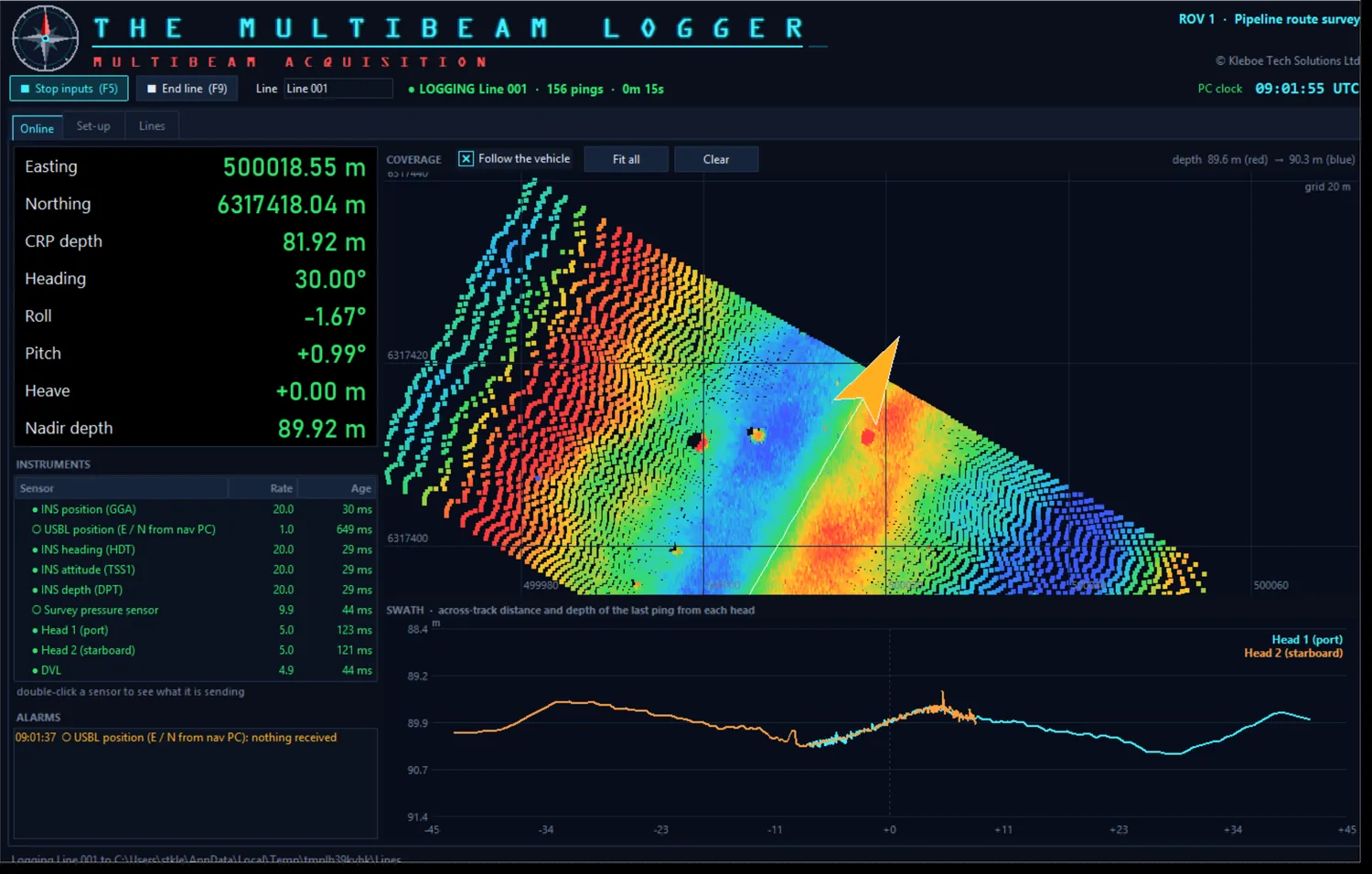
Logging a line from an ROV with a dual-head multibeam: the coverage, the swaths and the instruments.
ROV touchdown fixes · Pipelay
The Touchdown Monitor
Take the touchdown fixes during pipelay or cable lay at one press. The ROV sits on the touchdown point, you press TAKE FIX, and the averaged fix goes into the table and straight into the navigation software as a waypoint. A monotonous job, automated.
- Live ROV data on UDP or serial: position as NMEA GGA, LLD or any Easting / Northing string (such as a user-defined output from your navigation software), with the depth and heading in the same string or their own. A RECEIVED window for each shows the data arriving and what the program reads from it.
- One big TAKE FIX button (or F2): the number of positions and the rate you set are averaged into one fix, with the ROV offsets applied and the spread shown.
- KP and DCC of every fix against the runline, from an .rlx runline file or a Runline Generator project, on any datum and projection.
- Waypoint files (.wp2) written to a folder the moment each fix is taken, named by fix number, KP and DCC, with a CSV backup of every fix.
- Live plan with a work-class ROV drawn at its heading, its track, the runlines, KP lines, fixes and DXF / DWG field layouts.
- v0.2: time from the PC clock or ZDA + PPS, layback from the stinger tip, a lay corridor alarm, and The Touchdown Remote for a second screen.
- Reports as PDF, .docx or CSV: job details, geodesy, a plan of the touchdown points and the table of fixes.
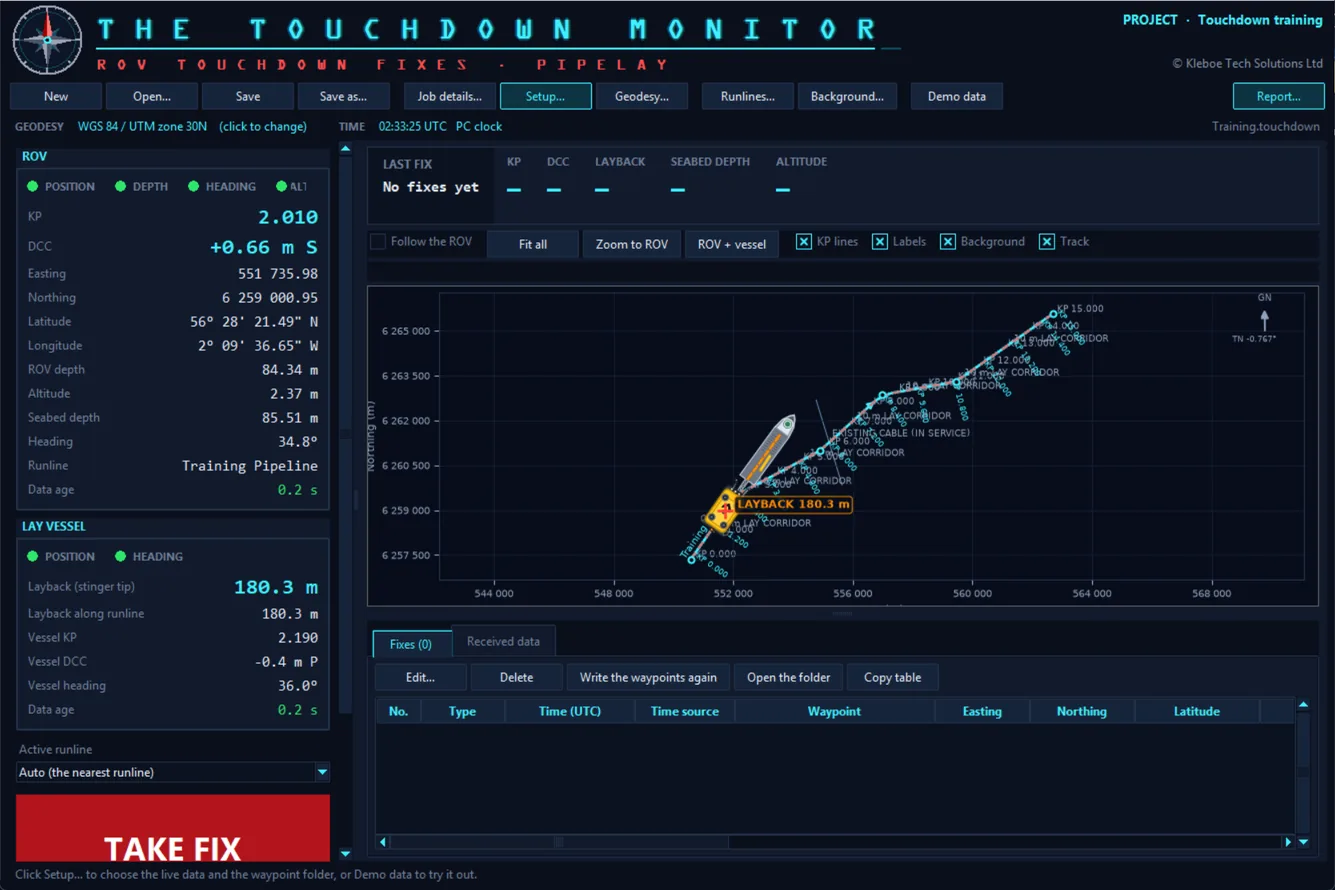
Three touchdown fixes along a pipeline, with the live ROV values, the KP and DCC, and the fix table.
Vessel & ROV shapes · .shp · DXF
DraftLight - Vessel Shape
Draw the outline your navigation display shows for a vessel, ROV or piece of subsea equipment, in metres around the CRP, and save it as a .shp shape file.
- Draw on a metre grid with snap, or type and paste X / Y points straight from a spreadsheet.
- Ready-made templates: vessel hull, ROV, TMS, clump weight, circles, rectangles, arrows and a CRP marker.
- Forward arrow tool to show each shape's heading, and Set CRP to put the reference point exactly where it belongs.
- Trace a GA drawing: load an image, scale it from a known dimension and draw over it.
- Simplify large drawings converted from CAD: a 1.4 MB vessel file came down to 315 KB with no visible change.
- Opens and saves .shp and DXF files, and saves projects to carry on later.

A vessel made from the hull template, with a forward arrow and a CRP marker.
Serial & UDP · Viewer · Formatter
String Format Manager
See exactly what every sensor is sending, pick out the fields you care about, and pass a clean, reformatted string on to the next system.
- Viewer with up to six fields per string, each turning red when its data goes stale.
- Output Formatter: build a new string from fields of an incoming one and send it on serial or UDP.
- Line filtering to pick one string out of a port sending several, by prefix such as
$GPGGA. - Text and binary inputs decoded into readable values.
- Input and Output Display tabs showing every port at once.
- Projects save your whole port setup so it loads in one click next time.
Sound velocity · CTD · SV probe
The SV Profiler
Open a CTD or SV probe cast and get a finished profile: downcast and upcast found automatically, a report-ready graph and a .usr profile file in a couple of clicks.
- Mean column SV, mean seabed SV, mean column density and seabed temperature worked out for you.
- Downcast, upcast or both, averaged into the depth step you choose.
- Project name, easting and northing and the instrument serial number on the graph, exported as PDF or PNG.
- .usr and CSV export of the processed profile at 1 m steps.
- Compare two profiles, or run an instrument calibration check with PASS / FAIL against your tolerances.

A processed CTD cast, both casts at 1 m steps, as exported to PDF.
GNSS · Gyro · Motion · Calibration · Verification
C-O Check
The daily sensor comparison done in seconds. Open the logged file, choose the reference and the sensors to check, and get the C-O, the statistics and a PDF report, with no spreadsheets.
- Calibration or verification: find the new C-O for each sensor, or check the applied C-Os against your limits with a PASS or FAIL for each comparison.
- Reads the logged file directly: .NPD logs or any comma separated text. It finds every GNSS, gyro and MRU, however many and in any order, with or without a date column.
- You choose the reference (the calibrated instrument) and the instruments to check.
- GNSS: mean ΔE, ΔN and ΔH, the mean offset and bearing, 2DRMS and spread. Gyro, pitch and roll: C-O and SD, with 3-sigma rejection of outliers.
- Static or dynamic: alongside or under way, with the vessel speed and rate of turn shown. Trim the start and end of the log.
- One PDF report with the job details, a results summary, a page of statistics and graphs for each comparison, and a sign-off table.

A gyro verification: both headings, then the C-O of every epoch with the mean, the limits and the rejected points.
Free · Conversions · Geodesy · Offshore
The Survey Calculator
The everyday sums and conversions of offshore survey in one place. Results update as you type, every answer has a Copy button, and everything you type is remembered for next time.
- Paste a position in any format: decimal degrees, degrees and minutes, degrees minutes seconds, NMEA or a whole GGA / RMC line. It works out the format and shows every other one, plus UTM with grid convergence and scale factor.
- Range and bearing with ΔE, ΔN and ΔZ between two grid points, a point from a range and bearing, and geodesic and rhumb line distances between two lat / longs.
- Vessel offsets to grid and back, and KP and DCC along a route line.
- Units: knots to m/s, km/h and mph with the Beaufort scale, plus distance, pressure, angle, volume, mass and temperature.
- Ocean: sound velocity (UNESCO, Del Grosso, Mackenzie), depth from pressure, towfish layback and acoustic travel time.
- GPS week and seconds to UTC, day of year, and a calculator that works in degrees.

A position typed in degrees, minutes and seconds, shown in every format and in UTM.
ROV gyro · C-O on deck
ROV C-O Check
Calibrate or verify an ROV's gyro on deck against the vessel's reference gyro. Set the ROV against a measured baseline, log both headings, and the program works out the C-O, the checks and a one-page PDF report.
- Calibration or verification: the new C-O to enter, or a C-O close to 0 that shows the existing value is still right.
- Reads the logged file: .NPD logs or any comma separated text with a time column, with the gyros found and named for you.
- Deck set-up: the way the ROV faces, its side to the baseline, two tape measurements and the baseline angle, checked on a location diagram.
- 3-sigma rejection, standard deviation, minimum and maximum, with PASS / FAIL checks against your limits.
- Gyro comparison chart of both headings and the C-O over time, with the rejected readings marked.
- One-page PDF report with the diagram, chart, results, checks and sign-off.

The results: the C-O, SD, readings and rejections, the checks and the gyro comparison chart.
Vessel · ROV · Tug · Offsets
The Offset Manager
One place for the sensor offsets of every vehicle on the job. Each vehicle has its own CRP, and every offset is shown on a drawing of the vehicle, so anyone can see at a glance where the sensors are.
- Any number of vehicles: vessels, ROVs, tugs, barges, AUVs and towfish, frames and tools, each with its own CRP (0, 0, 0).
- Drawn in plan, side and end view on a graphic of each type, at the same scale, with the CRP, the axes and every offset labelled.
- One clear convention: X + starboard, Y + forward, Z + up, shown on every drawing and on the report.
- Paste straight from a spreadsheet or document: a whole offsets table, with a vehicle made for each heading row.
- Change history: who changed which offset, when, from what to what, and why.
- PDF offset report with the drawings, the offsets tables and a sign-off, plus CSV export.

A vessel's offsets in side, end and plan view, with the offsets table below.
Test strings · Vessel · ROV · Multibeam
The Survey Simulator
Drive a simulated vessel and ROV and send realistic, correctly checksummed strings and multibeam data to your survey, DP or navigation software before mobilisation or while a sensor is down.
- Vessel and ROV tabs with position, heading, speed, turn and motion you set and adjust live.
- GNSS, heading, motion, depth and speed strings, plus ROV gyro, position and DVL.
- Multibeam on the vessel hull or the ROV, pinging a made-up seabed with sand waves, a pipeline, boulders and a wreck. Sends BTH0 packets over UDP, with a live swath, a coverage map and XYZ export.
- Several outputs, each on its own serial port or UDP address with its own strings and rates up to 100 Hz.
- Works with String Format Manager for a complete test bench on one PC.

Multibeam on the ROV, 10 m above the seabed: the swath on the left, the pipeline, boulders and sand waves building up on the right.
Runlines · KP lines · Offsets
The Runline Generator
Plan runlines on the real-world grid of the job: place the waypoints, give the bends a curve radius, and get the straights, curves, KP, KP cross lines and offset lines, ready to load into your navigation software.
- Any datum and projection: UTM, Gauss-Kruger, Transverse Mercator, Lambert and Mercator on WGS 84, ED50, OSGB36 or your own 7-parameter datum, or a local grid. Latitude and longitude shown beside every Easting and Northing.
- Place waypoints your way: click on the plan, drag them, type them as E/N or lat/long, or paste a list from a spreadsheet.
- Curves at the bends fitted to the radius you give, with the KP worked out along the whole line.
- KP cross lines at any spacing with different lengths to starboard and port, and parallel offset lines either side, or whole sets of parallel runlines run back and forth, separate or joined into one line.
- Runline files (.rlx) exported and imported, plus DXF and CSV, with DXF or DWG field layouts shown behind the lines.
- PDF runline report with the geodesy, plans and tables of waypoints, curves and KP lines.

A route from a platform to a template with KP lines every 100 m and offset lines at 25 m, over a field layout drawing.
Online survey log · Daily log
The Survey Log
The online survey log for everything that happens on shift. Click a quick button - ROV off deck, start of line, start DVR recording - and the time, the dive number and the log text are filled in for you. At the end of the day, export the daily log.
- Quick buttons for ROV dives, survey lines, DVR recordings with the path to the video file, logging, waypoints, SV profiles, gyro and GPS comparisons and more, plus your own.
- In progress now: the ROVs in the water and their dive time, the open survey line, recordings and logging, always on screen.
- Online nav setup changes with the old and new values and the reason, kept on screen for the next shift.
- Each ROV in its own colour: starboard green and port red, or any colour you choose.
- Missed something? Add it later at its real time, or change any entry, and the dive and line times update.
- Daily log as PDF, .docx or CSV for one day, a date range or the whole job, with tables of dives, lines, recordings, waypoints and setup changes.
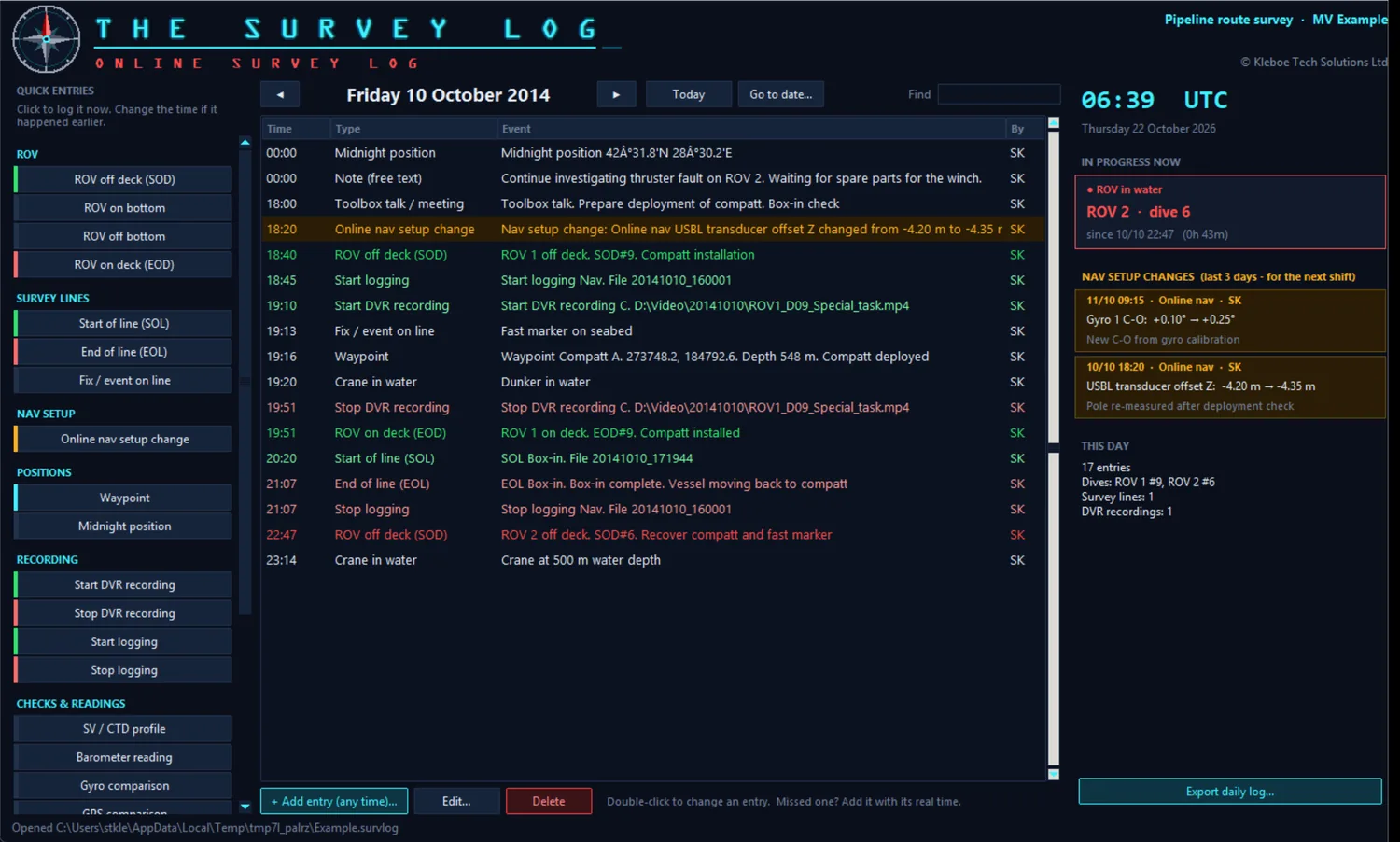
A day's log: ROV entries in their colours, what is in progress now and the nav setup changes for the next shift.
Vessel survey set-up · Ports · Drawing
The Mobiliser
Record how the survey spread is set up on a vessel: where everything is, what is plugged into what, and what every COM port, UDP / TCP port, multiplexer channel and video output is for. The Mobiliser draws the set-up, lists every port and IP address, checks for clashes and makes the set-up report.
- Locations and equipment: rooms, ROVs and areas, with templates that fill in each item's usual ports.
- Every kind of port: COM, UDP / TCP, LAN and IP addresses, multiplexer channels, fibres and video.
- The set-up drawing, drawn for you and tidied by dragging, with every cable coloured by type.
- Port lists and an IP address list for the whole vessel, and an equipment register.
- Clash checks: the same IP address twice, two programs on one UDP port, baud rates that don't match.
- Change log and reuse: every change with your initials, and a new job started from a previous set-up.
- Set-up report as PDF, .docx, Excel or CSV.

The set-up drawing: each location with its equipment, and every connection coloured by cable type.
Spool metrology · LBL · DQZ · Gyro · Beta testing
The Metrologist
The Metrologist is in beta testing with survey teams now and will be available to download soon, included in the Survey Software Suite licence. Want to know when it's out? Email us.
Guided subsea spool and jumper metrology: work through the task plan step by step and get the hub-to-hub distance, ΔZ, headings, α / β and hub attitude, with a finished PDF report.
- DQZ level loops with misclosure spread by time, loops tied to one benchmark, and the seabed profile along the route.
- Hub headings and pitch / roll from dockings at any rotation (0 / 90 / 180 / 270 or towards / away), so sensor offsets cancel.
- Direct ranges reduced to horizontal as an independent check on the LBL distance.
- PASS / FAIL checks against your task plan limits, design values and an estimated error budget.
- Import logged data from DQZ, gyro and range logs, paste from a spreadsheet, or type the averages.
- PDF report with plan view, seabed profile, every table and a sign-off box.
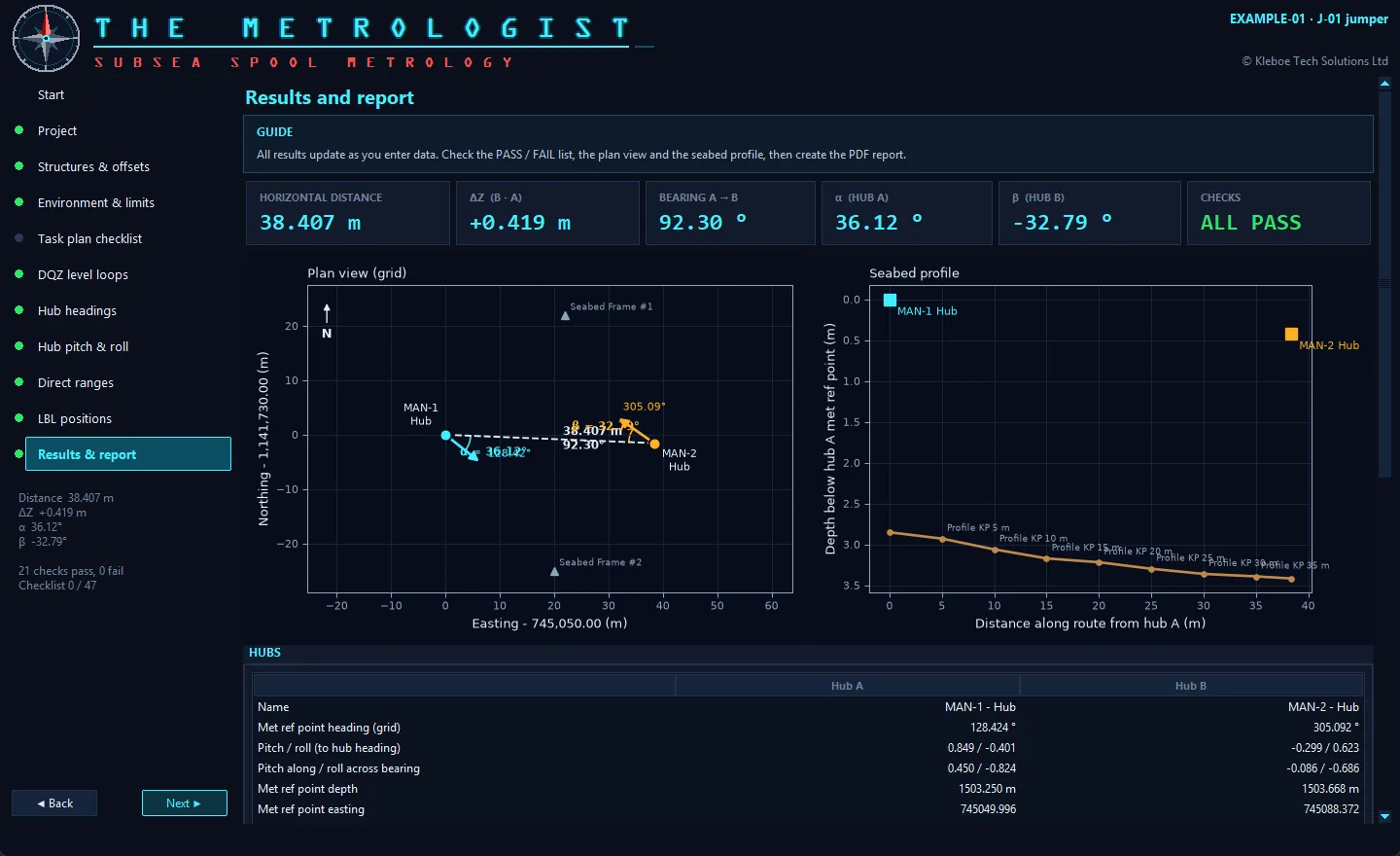
Results: distance, ΔZ, bearing, α and β, with the plan view and seabed profile (example data).

Free training
Training courses and certificates
Learn the software properly, at your own pace: watch the training video, do the hands-on course with The Touchdown Trainer's live simulated data, pass the quiz and get a certificate. Every course is free.
- Available now: The Touchdown Monitor operator training.
- More courses coming soon for the other programs in the suite.
Licence
One licence. Every program.
The Survey Software Suite is one 1-year licence for every program on this page, and for any new programs added during the year. Try each one free for 48 hours first. The Survey Calculator is free for everyone.
SURVEY SOFTWARE SUITE
The licence price will be confirmed soon. Until then, every program runs as a free 48-hour trial. Every program, plus The Metrologist when it is released.
- The Multibeam Logger
- The Touchdown Monitor
- DraftLight - Vessel Shape
- String Format Manager
- The SV Profiler
- C-O Check
- ROV C-O Check
- The Offset Manager
- The Survey Simulator
- The Runline Generator
- The Survey Log
- The Mobiliser
- The Metrologist coming soon
- One key: enter it once on each PC and every program is unlocked
- Up to 4 PCs · free updates for the year
- Works offline for 30 days at a time, handy offshore
THE SURVEY CALCULATOR
- Positions in any format and UTM
- Range, bearing, offsets, KP and DCC
- Units, Beaufort, sound velocity
- GPS time and a calculator
Online checkout opens soon. Your licence key will be emailed to you straight away, with a 14-day refund. By buying you agree to the terms of use.
Downloads
Downloads
Every program runs as a free 48-hour trial with everything working. Enter your Survey Software Suite key once on a PC to unlock them all. Each download includes the PDF user manual.
SURVEY SOFTWARE SUITE · everything in one zip
All the released programs with their user manuals and videos (about 680 MB).
First time you open a program
Windows may show a blue box saying "Windows protected your PC". This is normal for new programs downloaded from small developers. Click More info, then Run anyway. Windows only asks once for each program.
Unzip the download first, then double-click the .exe. Nothing needs installing.
Questions
FAQ
What do I need to run the software?
A Windows 10 or 11 PC. Each program is a single .exe: copy it to the PC and double-click. Nothing else needs to be installed, and no internet connection is needed to use it.
Will it work with my serial ports and USB adapters?
Yes. String Format Manager and The Survey Simulator use any COM port Windows can see, including USB-to-serial adapters and network serial servers, as well as UDP.
Which sound velocity instruments does The SV Profiler read?
CTD and SV probe files, and most other instruments that save a text file with depth and sound velocity columns.
Which navigation software can use DraftLight - Vessel Shape's files?
It saves .shp shape files (text, in metres from the CRP) and DXF drawings, and opens the same. The user manual describes the .shp layout, so you can check it against your navigation package.
What does The Metrologist need from the survey?
The Metrologist is in beta testing and will be available soon. DQZ level loop readings, gyro headings and inclinometer pitch / roll in the hub receptacles, direct ranges between the hub COMPATTs and the calibrated LBL positions. It reads logged text files, pasted columns or typed averages.
Which datum does The Survey Calculator use?
WGS84, with UTM for grid coordinates. For other datums such as ED50 or OSGB36, transform the coordinates in your survey software first.
Which files does C-O Check read?
.NPD comparison logs and other comma separated text files with a time column. Sensors are found from the column headings; for a file without headings you say what each column holds in the Columns window.
Which way do the offsets go in The Offset Manager?
Every vehicle has its own CRP at 0, 0, 0, with X positive to starboard, Y positive forward and Z positive up, in metres. The convention is shown on every drawing and on the report.
What data does The Touchdown Monitor need?
A live ROV position on UDP or a serial port: NMEA GGA, LLD or any text string with the Easting and Northing in columns, such as a user-defined output from your navigation software. The depth and heading can be in the same string or come in their own (for example $--DPT and $--HDT). It writes .wp2 waypoint files, and reads runlines from .rlx files or The Runline Generator.
How does the licence work?
Every program runs for 48 hours as a free trial. After that, one Survey Software Suite licence (price to be confirmed) unlocks all of them. Enter the key once on a PC, up to 4 PCs, and every program on that PC is unlocked, including new programs added during the year. The licence is checked online now and then, and works for 30 days at a time without internet - handy offshore.
Can I try before I buy?
Yes. Every program has a 48-hour free trial with everything working, and every user manual is free to download from this page. The Survey Calculator is free to use.
Have the programs been renamed?
Yes. The Shape Builder is now DraftLight - Vessel Shape, The Stringinator is String Format Manager, The Sensor Checker is C-O Check and The Stringinator Generator is The Survey Simulator, and Survey Software Utilities is now the Survey Software Suite. Your licence, settings and project files carry over.
Do you offer licences for a whole vessel or company?
Yes. Get in touch with the number of PCs and we'll send a quote.
Contact
Get in touch
Questions, quotes for team licences, or a string format you'd like added: send an email and we'll reply within one working day.
Kleboe Tech Solutions Ltd · United Kingdom